
Philips 10BDL5051T
The Philips 10BDL5051T is a newer generation of the Philips B-Line series, providing meeting room display features such as kiosking (locking the system to one app), PoE (power over Ethernet), VESA wall mounts, and LED indicator strips on the side.
All Philips 10BDL series tablets are officially supported by Fishbowl, so please reach out to us at [email protected] if you encounter any issues.
Set up the tablet for first use
There are two approaches to the initial setup.
- Automated Setup where you import a ZIP file, OR
- Manual Setup where you perform the steps yourself
Exit Kiosk Mode using Hardware Buttons
The panel is set up by default in "Kiosking mode". This means that it is locked to one app. Whenever you need to access the device settings, you need to press two of the hardware buttons simultaneously.
To access the Main Menu at any time, press buttons 1 and 3 together
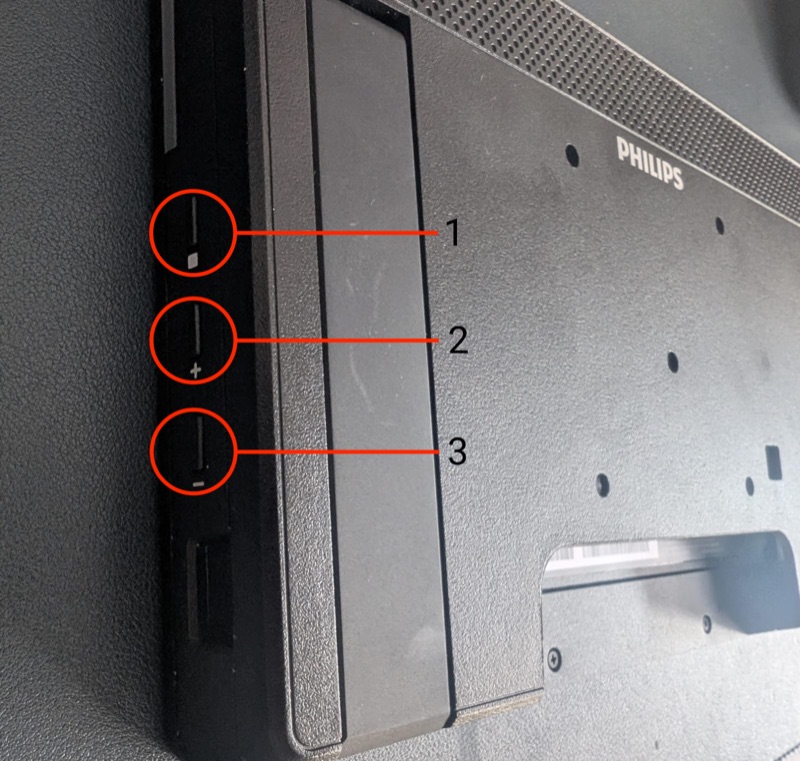 Once you've pressed the two buttons, you need to enter a PIN to unlock the device.
The default PIN is 1234