
Subscription quantity
Your Fishbowl subscription is linked to a quantity. Your subscription quantity determines the maximum number of devices that can be linked to your account.
Increasing your subscription quantity
If you Link more devices than your current subscription quantity, then your subscription quantity will be increased. If you are no longer in your free trial period, then a quotation will be shown to you when you link additional devices. Please note that you can link multiple devices at a time.
Decreasing your subscription quantity
If you have fewer devices linked than your subscription quantity, or if you Remove devices, then you can decrease your subscription quantity at your next billing date.
- Open a web browser (on a computer) and Log in to your Fishbowl account.
- Click on Billing > Account. Click on
Change subscription.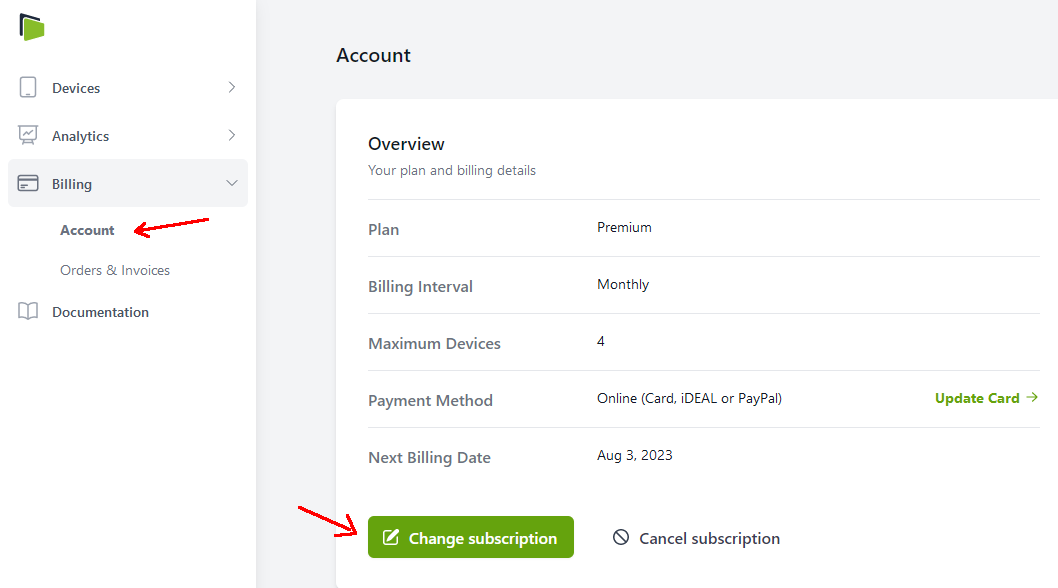
- Under
Number of Devices, decrease the quantity. Please note that you cannot decrease the quantity below the number of devices that you currently have connected, unless you Remove devices first.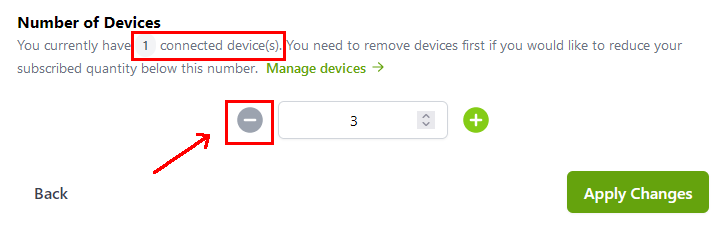
- Click on
Apply Changes. The changes will take effect at your next billing date.
Legacy licenses
If you signed up for a Fishbowl account prior to June 2023, then you would have linked your devices using a license code. License codes will remain backward compatible indefinitely; however, you will no longer be able to unassign a device from a license key. Instead, Remove and then Link the device using the new interface.