
Delete Your Fishbowl Meetings Account
Fishbowl Meetings does not require your name or any private personal details to create or maintain your account. All your private data remains locally on each device. However, if you wish to close your account and request deletion of your data, please follow the steps below.
1. Steps to delete your account
-
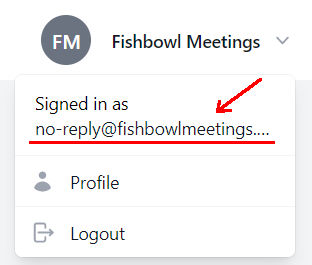
Identify the email address that your Fishbowl account is linked to. If you are signed in at fishbowlmeetings.com, then you can click on the top-right drop-down menu to see your email address.
-
Send an email from the account above to [email protected], with the subject
Delete account.
2. Types of data that are deleted or kept
General data
Your account profile (name and email) will be deleted, your subscription (if applicable) will be cancelled, all your devices will be disconnected, and (if applicable) all your anonymized analytics will be deleted.
Payment data
No payment card details are stored by Fishbowl. If your subscription is paid via our billing partner Paddle.com, your data is processed according to the Paddle Privacy Policy.
On-device data
All private meeting data is stored on your device and you remain responsible for managing that data.
- On Android, you can uninstall Fishbowl
- On iOS you can remove the Fishbowl app
3. Retention period
No retention period is applicable